
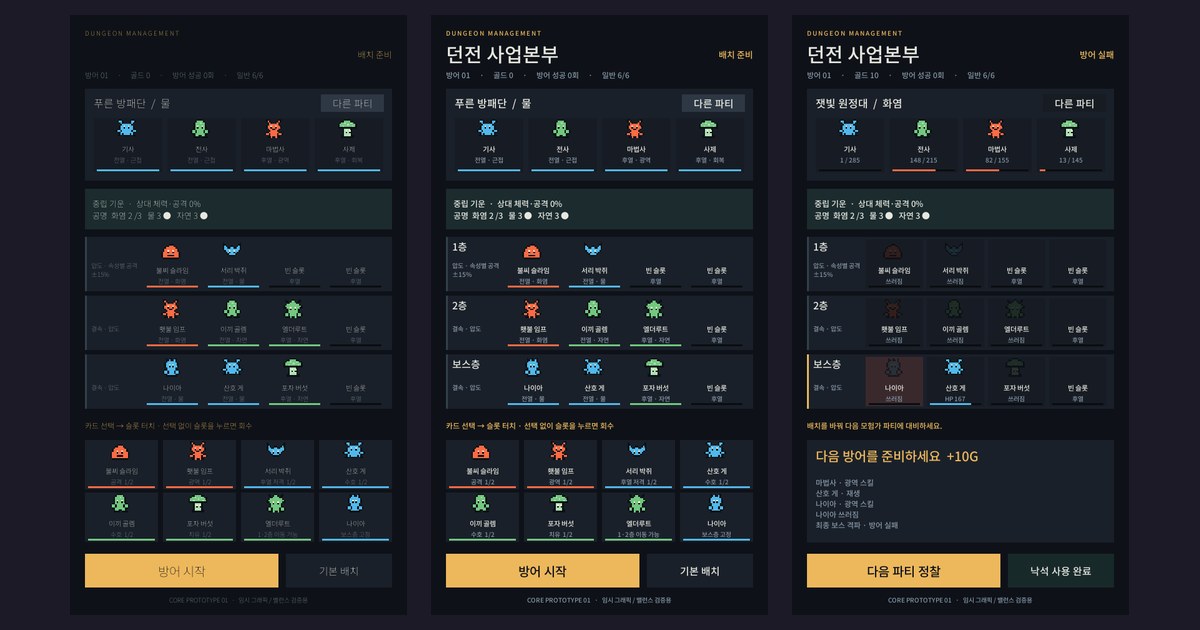
Dungeon Division (마계공단: 던전사업부 in Korean) is a game where you take the dungeon's side instead of the hero's. You look at the adventurer party coming in, place monsters on each floor and stop them. Today it has a ten-chapter story and an endgame, but it started as a handful of notes.
To write this devlog I went back through the commit history from the very first one. A commit is a snapshot you save every time you change the code, so it records what I did down to the minute. It reads a lot like a diary, so I decided to follow it one post at a time. I'm also only using screenshots and art that existed at the time. No current game screens.
Part 1 covers the day I created the project, September 14, 2026. Ten commits.
From notes to a design doc
This is what I had written down at first:
- A solo-player game where I run a dungeon
- Stop the adventurers from clearing it
- Each party has a main element, and my monsters' elements make the adventurers stronger or weaker
- Monsters wear gear, and maxing out their level cap unlocks an ultimate
Sounds fun, but you can't build that. How much is "stronger or weaker"? When does it apply? Where does the player see it? None of that was there. So the design doc I committed with the first commit (826 lines) opens with a table that pairs each note with what it actually becomes in the game.
| Note | In the design doc |
|---|---|
| Stop adventurers from clearing it | Defense succeeds if the party is wiped out or runs away, fails if the final boss falls |
| My monsters' elements buff or debuff adventurers | Dungeon aura: the element mix of placed monsters changes adventurer stats |
| Monster combos buff or debuff monsters | Resonance (whole dungeon) and floor combos (same floor) |
| Placement limit, raised by dungeon level | Floor layout and a dungeon level table; always two bosses, mid and final |
| Collect monsters, equip gear | Loot gear: my monsters wear the gear of adventurers they defeated |
Where a note was vague I wrote down my reading and flagged it "needs confirmation". "Normal skill" in the boss notes I took to be a typo for normal attack. "Raise the max level to get an ultimate" I read as breaking the level cap all the way, in other words full awakening, and noted next to it that granting it on the first break was also an option. I locked bosses at two from start to finish, regardless of dungeon level.
Writing the doc added a lot that wasn't in the notes. A side cross-section view of the dungeon where each floor is one fight. An attrition rule where adventurers don't heal between floors. A guild trend system that sends parties strong against the element you use most. And there's one line in the doc I still like best: "Yesterday's knight's sword is in our goblin's hand today."
Two setting ideas
One was dark fantasy: a demon lord beaten by the hero, rising again from the ruins. The other was about getting posted to the demon army's "Dungeon Business HQ" as a new dungeon manager. I went with the second.
You inherit a two-floor dungeon that's losing money, and to pass head office's quarterly review you have to stop adventurers and earn money from the loot. What I liked about this setting is that office vocabulary turns straight into system names. Story chapters become quarterly reviews, daily quests become orders from HQ, and the monster gacha becomes a job posting. The tone is light black comedy: the adventurers are deadly serious, the monsters are salaried office workers.
That direction has held all the way to now. The name changes a few days later. The first name that showed up on screen that evening comes up below.
Who is it for
The doc names a target too. First, people in their 20s and 30s who've played collection RPGs, especially the ones who enjoy building combos in auto chess or deckbuilders. Second, idle players who drop in briefly and often, who I'd catch later with a "business" mode. There's also a note that anyone who has read dungeon-management web novels or webtoons (a big genre in Korea) would get it without explanation.
I wrote down four ways it differs from similar games:
- The monsters you place buff your own side and also change enemy stats.
- The adventurers' guild learns which element you use most and sends counter parties. One winning lineup won't keep working.
- Loot is your monsters' gear.
- Each dungeon level adds floors going down.
Three lines for when I can't decide on a feature
Read and counter. Composition is strategy. Your dungeon grows.
These three lines sit near the front of the doc, and I still come back to them whenever I'm unsure whether a feature belongs. If it doesn't make any of the three stronger, it waits.
I also set the flow of one run here. Scout the next party (10 seconds), place monsters (30 seconds to 2 minutes), watch the auto battle floor by floor (1 to 2 minutes at 2x), check the result (10 seconds), level up monsters. Then scout again.
One question for day one
At the very end of the doc I listed the build order and a question to check at each stage.
| Stage | What to build | Question to answer |
|---|---|---|
| 1. Core prototype | Floors and slots, monsters and bosses, adventurer parties, auto battle | Is it fun to change placement after seeing the enemy? Do results make sense? |
| 2. Growth loop | Levels, awakening, loot gear, story chapter 1 | Do you want one more run? |
| 3. Live loop | Idle business, guild trends, facilities | Is there a reason to come back daily? |
| 4. Launch prep | Monetization, more story, raid parties | Soft launch metrics |
Under it I wrote:
Stage 1 matters most. If "scout, then change placement" isn't fun, nothing stacked on top will save it.
So day one had no art, no sound and no menus. Only enough to answer that one question. The stage 1 plan called for 15 monsters, 3 bosses and 6 parties, which still looked like too much, so I cut day one down to 6 monsters, 2 bosses and 3 parties.
Dev setup, and the AI tools
At 4:29 p.m. I committed an empty Unity project. Unity 6.3 LTS, 2D, portrait. For Korean text I added Noto Sans KR, which is free to use.
The first thing I cared about was letting an AI coding tool work inside the Unity editor directly. I'm alone on this, so I wanted to hand off as much of the loop of writing code, building scenes and running to check as I could. In the 5:07 commit, through that connection, the tool could open the editor, load a scene, and press play and stop.
I build this game with a lot of help from AI tools, for both code and art. What to build and when something counts as done, though, I write down first in the design docs, and I check results with automated tests and by playing. Most of the speed as a solo developer came from the tools. Not losing direction halfway came from the docs.
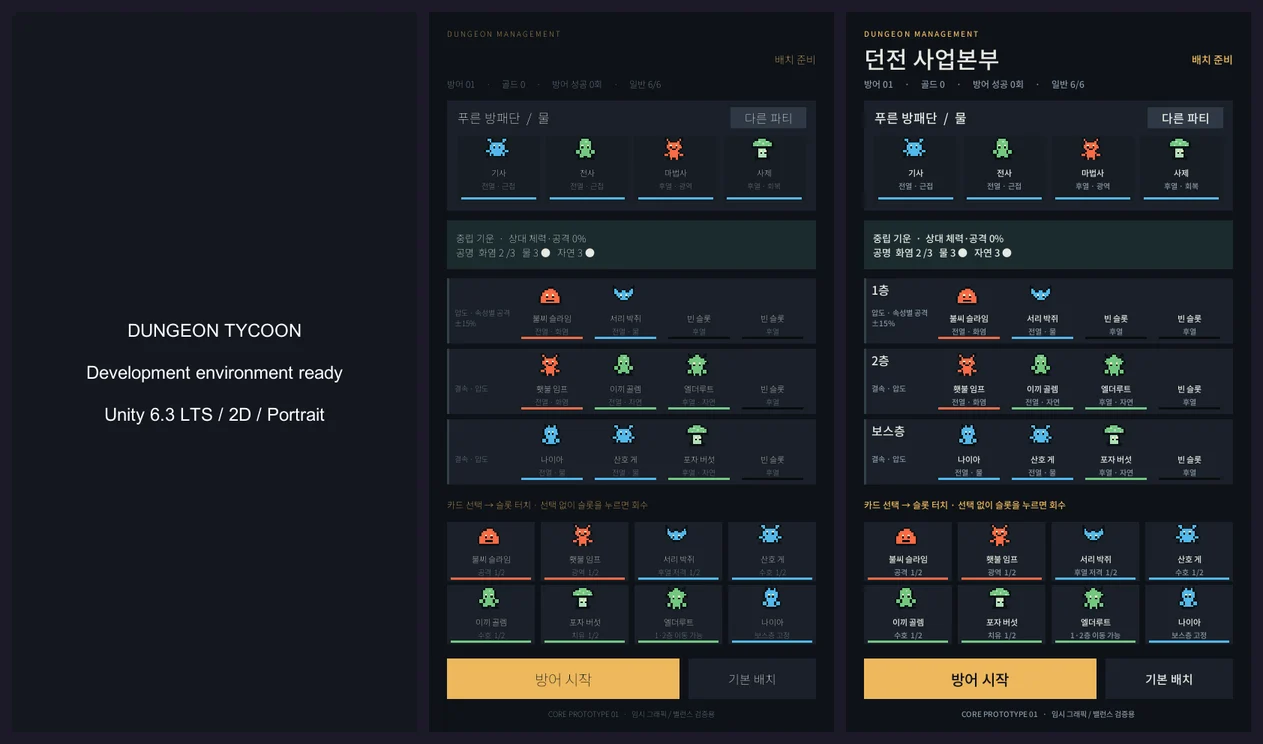
Dev notesDay-one dev environment
- Unity 6000.3.24f1 LTS (Apple Silicon), URP 2D renderer
- uGUI, Input System
- MCP for Unity: the bridge that lets the AI tool talk to the editor. I pinned the package and server versions. Recompiling drops the connection for a moment, and it reconnects once the editor is ready
- A 540×960 portrait preview menu and a screen capture tool
Using the editor's automatic capture leaves two lines of Metal graphics logs. Turning off the depth buffer didn't make them go away. The screen and the game ran fine, so I left the defaults and noted it in the README. The screenshots above were taken with that capture tool.
Around 9 p.m. I installed the same editor version on a Windows 11 PC. I installed Unity Hub unattended from the command line, put the editor on the D drive, and pulled the Android and WebGL modules in one go. A headless batch-mode run showed zero compile errors and a passing prototype check. The point was to be able to pick up work on either the Mac or the Windows machine. The editor connection kept dropping on the Windows side, so I fixed it again 30 minutes later.
5:29 p.m., the dungeon ran
At 5:29, exactly an hour after creating the project, I committed a "playable dungeon defense prototype". Here's what that dungeon had:
- Three elements: Fire, Water and Nature. Fire beats Nature, Nature beats Water, Water beats Fire. Advantage deals 1.3x damage, disadvantage 0.8x.
- Six monsters, two per element. Two bosses: Elderroot, a Nature mid-boss, and Naia, a Water final boss.
- Floor 1, floor 2 and the boss floor, four slots each. Up to six regular monsters, at most two of the same kind. The final boss is locked to the first boss-floor slot.
- The incoming party is one of three: a Water shield company, a Fire expedition or a Nature tracker group. Knight, warrior, mage and priest.
- Adventurers don't heal going down floors. Whatever the upper floor chips off makes the lower floor easier.
- Combat is automatic and you can only change speed. The one thing the player does directly is Rockfall, a single hit on the whole party, once.
There were quite a few combat rules even in this simple form. Adventurer HP: knight 285, warrior 215, mage 155, priest 145. Each adventurer brings one potion and drinks it below 30% HP to recover 25%. Healers like the priest or the spore mushroom heal the lowest-HP ally for 35. Bosses use their power exactly once when they drop below half HP, healing 20%.
Adventurers could also run away. When moving to the next floor, if the party's total HP is at 25% or lower, there's a 40% chance they flee, which also counts as a successful defense. If 150 seconds pass with no result, the adventurers retreat. I also added an "other party" button to swap the incoming party by hand, so I could keep the same placement and compare against different enemies.
The screen reads top to bottom. The incoming party at the top, below it the aura and resonance your current placement creates, then the floor slots, and at the bottom the monster cards and the "Start defense" button.
The numbers on screen
The synergy rules from the design doc all went in on day one, in simple form:
- Dungeon aura: if one element makes up more than 40% of placed monsters, you get that element's aura. If it beats the adventurers' element they get weaker, and if it loses they get stronger. "Neutral aura · enemy HP/ATK 0%" in the screenshot is this.
- Resonance: gather 3, 6 or 9 monsters of one element and all monsters of that element get stronger. Fire gets attack, Water HP, Nature speed.
- Floor combos: two or more of the same element on a floor gives "Bond" (skill cooldown -10%). Mixed elements give "Overwhelm" (attack ±15% depending on matchup).
One change to placement makes your monsters stronger and shifts enemy stats at the same time. The doc says "one placement is both a buff and a way to control the field", and on day one that was already running as numbers.
The default placement lost, the adjusted one won
There was nothing you could call art. Tiny placeholder pixel icons, cards and HP bars. But it answered what I wanted answered that day: does changing placement after seeing the enemy change the outcome?
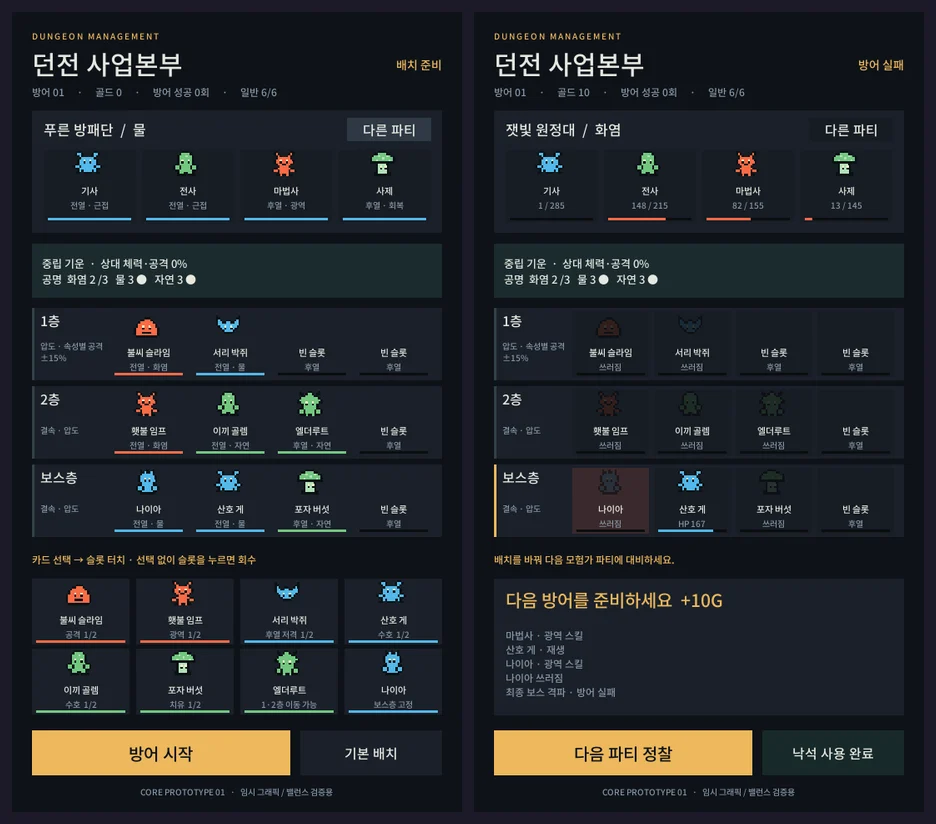
The default placement, put down without thinking, lost. Like the screen on the right, Naia on the boss floor goes down and "Defense failed" comes up. A placement stacked with the element that beats the incoming party won.
Sounds obvious, but the opposite would have been a problem. If results came out about the same however you placed things, the placement screen would just be a chore. Then you could pile on auras and resonance and everyone would still hit auto-place. I was relieved this held up on day one.
Dev notesThe combat rules are one 180-line file, separate from the UI
I split UI and combat math from the start. A single DungeonSimulation.cs holds matchups, placement rules, aura, resonance, floor combos and battle flow. The UI only draws what it returns. That meant I could run hundreds of battles with no graphics at all.
This was the whole matchup table:
public static float Affinity(Element attack, Element defense)
{
    if (attack == defense) return 1;
    return ((attack == Element.Fire && defense == Element.Nature) ||
            (attack == Element.Nature && defense == Element.Water) ||
            (attack == Element.Water && defense == Element.Fire)) ? 1.3f : 0.8f;
}
Aura counts each boss as two monsters. If the top element is under 40%, or two elements tie for first, there's no aura, and it steps up past 60% and 80%. Each step moves adventurer stats by 10%.
That day I also made the same seed always produce the same battle. One editor menu item checked all of this at once:
- Placement limits (six monsters, two of a kind, boss slots)
- Matchup and aura math
- Adventurer HP carrying over between floors
- Rockfall working only once
- Same seed, same result
- All nine combinations of 3 parties × 3 placements finishing normally
I built a separate check for the button flow too. In play mode: place, press start, reach the result screen, and from the result press "next defense" and land back on placement. One menu click instead of me tapping through every time.
Being able to talk about balance in numbers instead of feel made a big difference. That nine-combination check moved over intact when I rewrote the combat engine two days later.
In the evening: growth, saving and loot gear
Once it worked, the next question was "do you want to keep playing?" That was the stage 2 question, but I pulled it forward. So that night I added growth and saving first.
- Monsters and bosses go from Lv.1 to 20. Each level adds 12% of base HP and attack. Upgrade cost starts at 20 gold and goes up 10 per level.
- Defense stages 1 to 100. Winning moves you up a stage, and enemies get 6% stronger per stage. Losing keeps the stage and sends a different party.
- Rewards are 40 + 5 × (stage − 1) gold for a win and 10 + 2 × (stage − 1) for a loss.
- Autosave every time you change placement, upgrade or settle a battle.
Thirteen minutes later, at 9:57, I added that line from the design doc: loot gear. Each defeated adventurer drops a fixed piece of gear for their class.
| Defeated adventurer | Gear | Effect |
|---|---|---|
| Knight | Shield (armor) | HP +30 |
| Warrior | Sword (weapon) | ATK +5 |
| Mage | Staff (weapon) | ATK +6 |
| Priest | Necklace (accessory) | HP +20 |
Gear keeps its original owner's element, and if it matches the monster wearing it, that's another +2 attack. Adventurers who escape alive drop nothing. Even if the defense fails, you keep gear from the ones you took down. The design doc had no numbers for this, so these were placeholder values.
With that, "a slime holding the hero's sword" became possible by the rules. Having it actually show on the sprite came much later.
I touched the battle screen a little too. Characters move when they attack, damage numbers pop up in orange and healing in green, and fallen units shrink and darken. The animations run on real time, so they stay readable at 2x and 3x, and they don't affect the combat math.
Dev notesThe first save system
Saves are one JSON file on the device. I got two things in from the start:
- Backup: each save keeps the previous file as
.bak. If the main file is corrupt it restores from the backup, and if neither can be read it tells the player and starts fresh. - Format version: adding gear bumped the save format to v2. Gold, levels, placement and progress from v1 files still load.
The gear check also tests that the same battle's gear can't be granted twice. Double settlement is something I kept worrying about from here on.
10:15 p.m., documents instead of code
One of that night's commits wasn't code at all. I split the single design doc into seven: index and roadmap, shared foundation (data tables, saving, screen structure), lobby, elements and synergy, dungeon and placement, monsters, and bosses. 2,152 lines together.
The prototype was a toy to see "is this fun?", and it had answered that. Now I had to build the real thing, and the scariest part of building alone is rules that only live in your head. Me three days from now will decide differently from me today. So every doc got rules, data tables, screens, flows, edge cases, how the current build differs, and a "this is done when" check.
These docs already had a list of 13 open decisions that day. Do you own monsters per species or per individual? Do level-ups use experience points? Real-time combat or turn-based? How much does the player step into combat? For the last one I made "manual ultimates plus three powers" the default over "fully automatic". More on that list in part 2.
Commit log, Sep 14, 2026
- Empty Unity project, design doc v0.2
- Unity 2D setup, AI tool ↔ editor connection verified
- Noted the editor auto-capture limitation
- Playable dungeon defense prototype
- Windows PC dev environment
- Fixed the Windows editor connection dropping
- Monster upgrades, progress saving, stage difficulty
- Loot gear and equipping, damage number effects
- Seven design docs (2,152 lines)
- Foundation code and lobby skeleton
Dev notesTask IDs go into the commits too
I split the design docs' to-dos by area with a prefix: BAS for foundation, LOB for lobby, SYN for synergy, DUN for placement, MON for monsters. Every task has a done-condition, and commit messages use the same IDs. The next morning's commit reads feat(BAS,LOB): finish foundation and lobby scope, for example.
It also made handing work to the AI tool easy, since I could scope it tightly: "finish this task from this doc, to this standard". The reason I can write this post from the commit history alone is this habit.
The last commit of the day started a new structure instead of growing the prototype code:
- Four scenes: boot, title, main and battle
- Monster, skill and party data kept as CSV tables and imported into Unity assets from the editor
- A save service and a screen navigation framework
- Code split into Core (rules), Game (progress), UI (screens) and Editor (tools)
Keeping the rules ignorant of the UI was the approach that had worked well in the prototype that afternoon, scaled up. The prototype itself gets deleted wholesale two days later.
Looking back on day one
Nothing from that prototype screen is left in the game today. There are five elements now, the dungeon goes deeper, and pixel characters fight instead of cards. But the two things I confirmed that day are still true: changing placement after seeing the enemy changes the outcome, and rules live apart from the UI so they can be tested as numbers.
If you're building your first prototype, I'd suggest narrowing day one to a single question. Once you get a "yes" to it, what comes next feels a lot less daunting.
Next time: the two days I deleted this prototype and built the real foundation, and the day the art style became pixel art. If you'd like to see the game first, the game page (in Korean) has screenshots.
NOW AVAILABLE
Dungeon Division
Heroes are intruders, monsters are staff. Save Dungeon No. 7 from being shut down.
Available on the Korean App Store (iPhone/iPad), with English in Settings. Android is not out yet.