
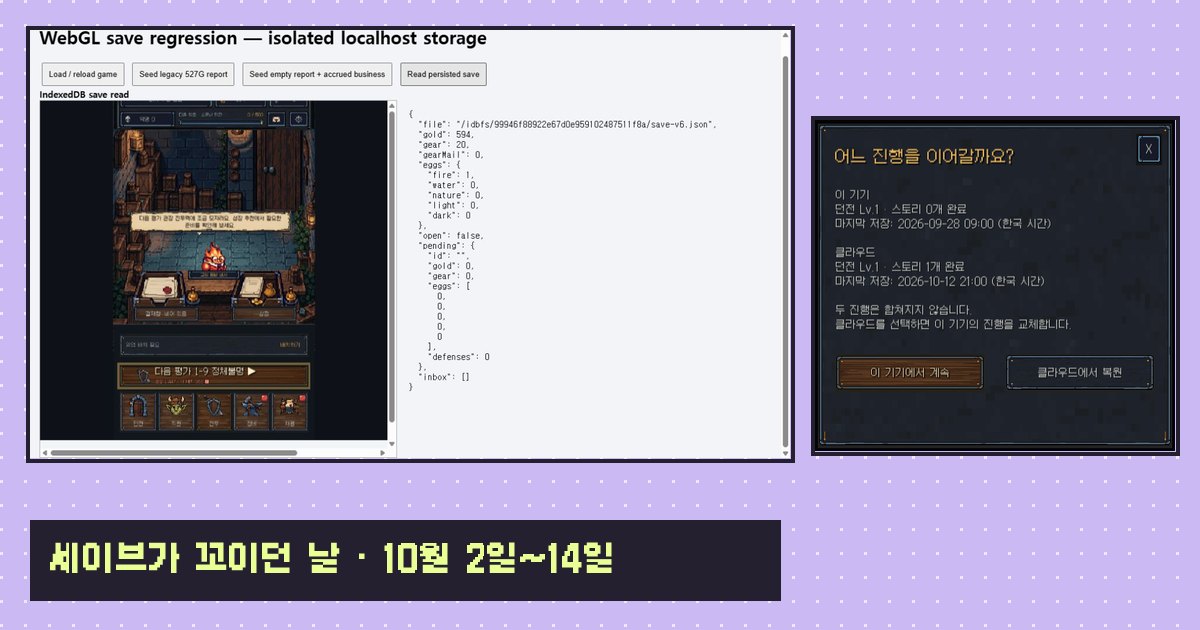
Dungeon Division is a mobile dungeon management game where you side with the dungeon, assign monster staff to floors and stop the adventurers who come raiding. I make it alone, and it's out on the App Store now. This post is about save system bugs. There's no shiny feature in here. It's a log of bugs where gold came back after you spent it or gear quietly disappeared, and how I fixed them one by one.
From Oct 2 to Oct 14 I counted 14 commits that touch saving. About half of them came out of a full playthrough I did on Oct 7 and wrote up as a numbered list. The commit messages carry tags like "playtest 2026-10-07 #01", which made it easy to trace each bug back to where it showed up.
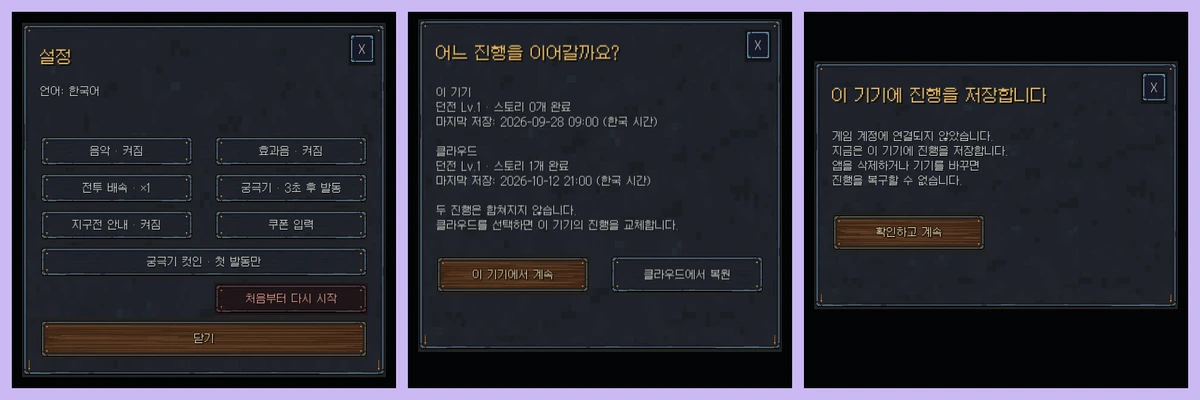
I barely have screenshots of the bugs themselves. So this post uses two test screens I committed at the time, plus two diagrams I drew from the commit messages. The diagrams are labeled as diagrams.
The bug where saving gave your money back
The first one I caught on the night of Oct 2. Clearing a story stage for the first time pays a first-clear Gold bonus, and after saving, that Gold was gone.
The cause was in the save structure. My save still carries the progress format from the prototype days. When I moved to the new save format I didn't remove the old one in one go, so saving included a step that built a copy in the old format and then applied it back onto the new data. Settlement put the first-clear Gold into the wallet, but the old copy still had the earlier amount. The moment the game saved, the old value overwrote the new one.
That night I fixed it with one line that syncs the old copy's Gold to the wallet at the end of settlement. I added checks too. Does the Gold survive a save after a first clear? Does calling the same settlement twice pay only once? Does a first clear near the Gold cap stay under the cap? The same test also covers replays (only the normal reward gets saved) and losses (only the loot and the Gold lost to a breach get applied).
Three days later, on Oct 5, something similar turned up. Battle settlement made relic shards disappear. This time the function that copies the wallet moved Gold, gems, Upgrade Stones and the element currencies, and skipped relic shards. Relic shards were a new currency added with the dig content at the end of September, and I hadn't updated the copy function when I added them. The fix was literally one word.
Oct 4: rescuing lost business reports
Business is the idle mode. While you're away the dungeon takes visitors on its own, and when you come back you approve a report to collect the rewards. Sometimes that report vanished.
Unity's built-in JSON serializer doesn't write an empty object field as null. It writes an empty object. Because of that, my code had a rule: a report with no ID counts as no report. But settlement adds rewards onto the existing report. If the save file had an empty shell left in it, the next settlement piled Gold and gear into that shell, and since it had no ID, the next load deleted it as "no report".
So I wrote a separate function that cleans reports up. If any of Gold, gear, Eggs or defense count has something recorded, it gives the report a new ID and keeps it. If no document in the in-tray points to that report, it adds a fresh business results document. It only deletes the report when it really is an empty shell.
I verified this in a web build. I planted an old-format report worth 527 Gold directly in browser storage, loaded the game, then read the save file back to check the result.
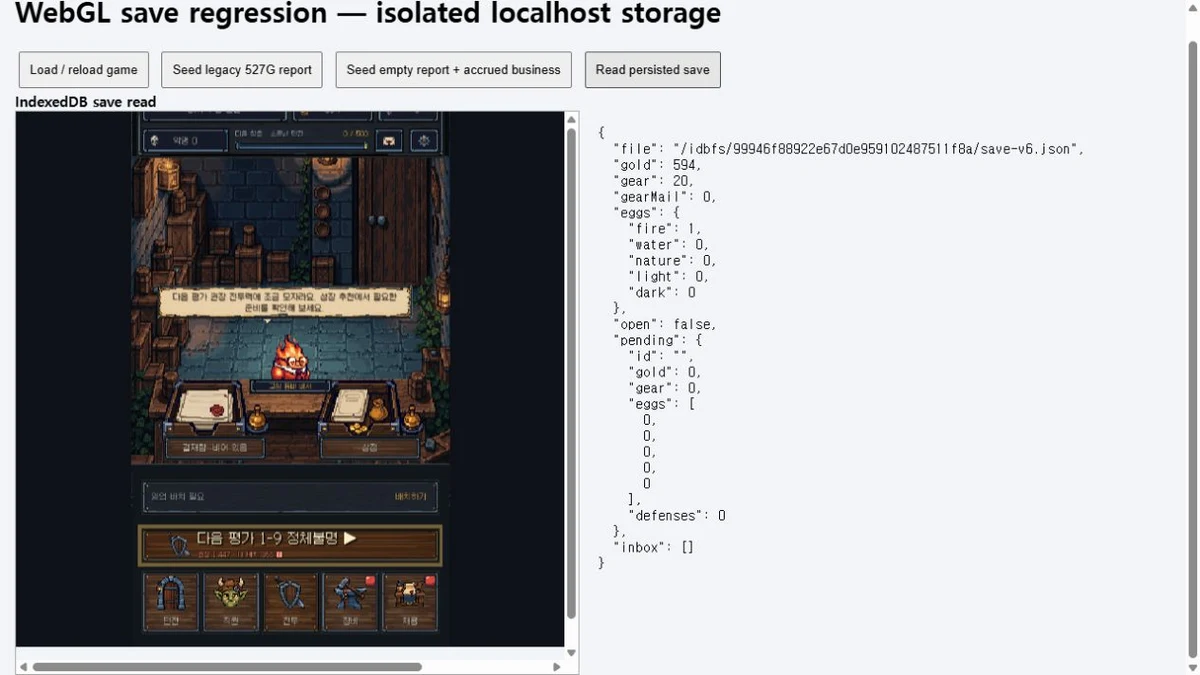
Dev notesA save that still carries an old-format copy
The game started with one simple progress object, and in part 2 I rebuilt settlement and saving. Some UI code still read and wrote the old progress data, though. So there was an adapter that projected the new save into an old-format copy, let the screens use it, and applied it back to the new save right before writing.
The trouble is when the new save changes directly between the moment the copy is made and the moment it's saved. If settlement puts Gold in the wallet, or a screen takes money straight out of the wallet, the copy still holds the old value. On Oct 2 I only synced the copy's Gold at the end of settlement. On Oct 8 I changed saving to rebuild the copy every time, which shut down this whole class of bug at once. The regression check even confirms that the old apply path now throws, so if anyone (me) uses it again later, it fails right away.
What the Oct 7 playtest turned up
On the evening of Oct 8, between 8 and 10 pm, I closed playtest items #01, #02, #04, #05 and #06 in five commits.
#01 The office shows only a brick background
Every defense processed in Business mode gets a request ID. The loop that built those IDs added the loop counter to the defense count, and the defense count was also growing inside the loop. So IDs skipped like 0, 2, 4, and the batch after a two-defense batch reused the previous batch's last ID. Settlement threw an "already settled" error, and because that happened while the lobby was drawing, all that was left on screen was the brick background.
I changed request IDs to come from the 20-minute time slot each defense happened in. The same slot can't be settled twice. If one defense fails, it's marked invalid on its own instead of stopping the whole batch. And if settlement fails, it just logs and the screen still draws.
#04 I upgraded the Forge and my Gold didn't move
Upgrading the Forge to Lv2 should cost 20,000 Gold, but my balance stayed at 1,036,175. The old-copy problem again. Facility upgrades take money straight out of the wallet and request a save, and the save re-applied the old copy, putting Gold back to the pre-payment amount. Gear upgrades go through a different path, so they were fine.
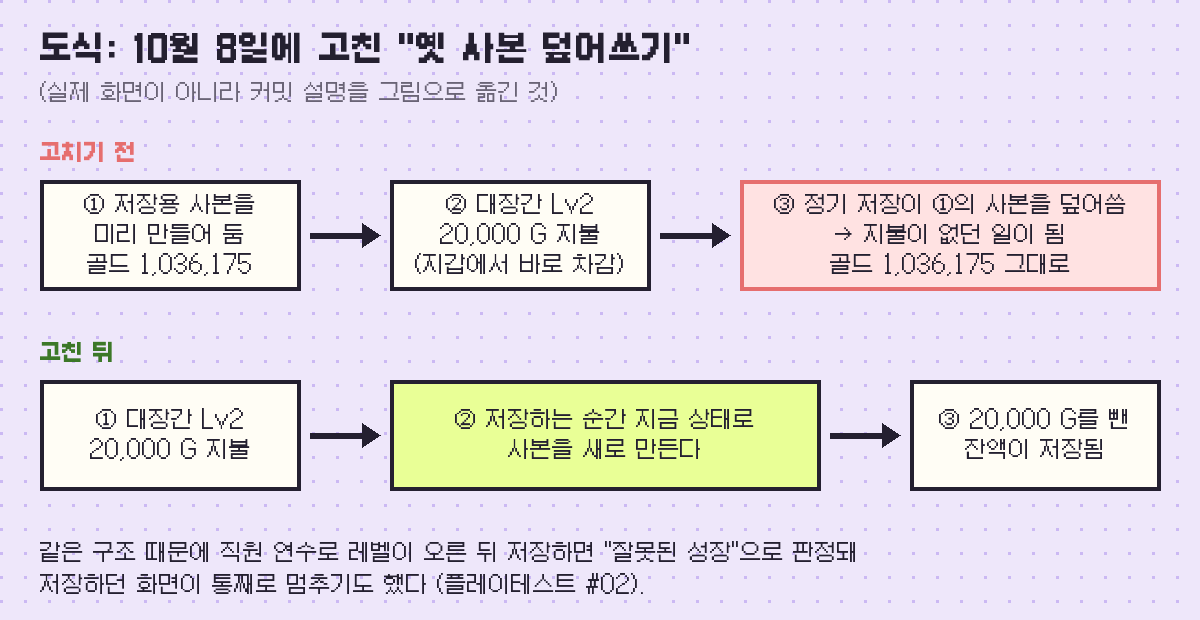
#02 The result screen button does nothing
Same cause, worse symptom. Level up a staff member through training, then save, and the old copy still has the previous level, so the save throws an "invalid growth update" error. Whatever screen called the save stopped right there. The gear screen froze halfway through an update, and the battle result confirm button cleared the result, then hit the error, so it became a button that does nothing when you tap it.
I made this commit 30 minutes after fixing #04. I removed the Gold-only patch from earlier and made every save rebuild the copy. If saving fails when leaving a battle, the result screen now shows a retry button. If settlement throws, you get a retry prompt instead of an endless battle screen. If a screen fails to draw, it shows you the way back to the office. I also added logs for screen changes and settlement time, so I can read them on a tester's device.
#05 Gear vanishes when the mailbox is full
This one hurt the most. When the mailbox went over 100 slots, the game automatically salvaged the oldest mail, whatever its grade. On top of that, Business gear traveled from storage through the mailbox into the report, so if you settled with a nearly full mailbox, you received nothing and the mail count dropped from 98 to 95.
I removed auto-salvage completely. The mailbox can now overflow by up to one battle's worth of items. When it's full, the game shows "Sort your gear" before you enter a battle or a dig, with a shortcut to the salvage screen. Business gear now goes straight into the report without passing through storage. Approving a report waits until storage and the mailbox have room, and tells you how many slots you're short.
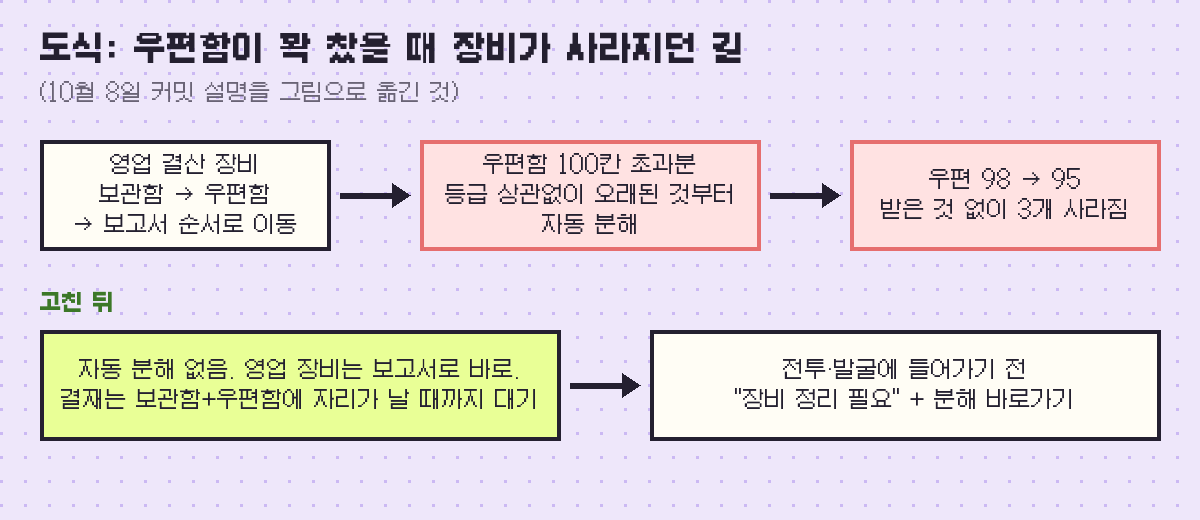
The check builds every combination of storage at 499/500 and the mailbox at 98, 99 and 100, then confirms that no gear ID goes missing and that a blocked approval pays exactly once after space opens up.
#06 Back button loops between the dig and the workshop
Not a save bug, but I fixed it the same night. The dig screen and the relic workshop each have a shortcut to the other, and every tap pushed a new entry onto the screen history. Pressing back bounced you between the two, and getting to the office took a lot of presses. Now, going to a screen that's already in the history returns to that entry instead of stacking a new one. However many times you go back and forth, two back presses get you to the office.
Oct 10: fixing the frame rate
On the night of Oct 10 I looked at performance. Unity on mobile runs at 30 fps unless you set it, so even on high refresh rate phones, scrolling ran at 30. I raised it to 60 and turned on the Android frame pacing option. I also changed the safe area calculation (the region that keeps UI clear of notches and home bars) to run only when the value changes instead of every frame, and stopped re-sorting the draw order of characters and effects every frame in battle when nothing had moved. The checks confirm the order matches the old one across 200 random lineups, and that nothing is allocated when nothing changed.
Cloud save: progress stays on the device, only a copy goes to the server
On Oct 12 I decided whether to back saves up to a server. It was the same day I picked Firebase for the payment server, so the two had to be decided together.
Here are the rules I settled on.
- Progress is saved on the device by default. The server keeps one copy for recovery. Old versions aren't kept, each upload overwrites the last.
- Uploads happen automatically, only when the app goes to the background. At least an hour has to pass since the last upload, nothing is sent if nothing changed, and there's a cap of 10 a day. There's no "back up now" button.
- The 10-a-day cap is enforced in the server security rules, separately from the app. The day resets at midnight Korea time by server clock, not the device clock.
- It's meant for restoring when you switch to a new phone on the same OS. Moving between Android and iOS isn't supported.
- For anything bought with real money (entitlements, passes, supply claim records), the server purchase records win over the save copy.
If a new device already has progress and the server also has a backup, a prompt asks which one to continue. The two are never merged. If you're not linked to a game account, the game tells you up front that progress lives only on this device and can't be recovered if you delete the app.
I wrote down a known limit too. Once the 10 uploads for the day are used, later progress doesn't make it into the backup until the first upload the next day. It's still saved on the device, so this only matters if you switch phones in that window.
There's no separate login screen. You start anonymous and the game links automatically to Google Play Games on Android and Game Center on iOS. With an anonymous account alone, reinstalling or changing phones creates a new account, so the backup and purchase history look like they're gone. That's why the design doc says "do not ship with anonymous login only".
I also did a rough cost estimate. Even assuming a 50KB save uploaded 10 times a day, it stays inside the free tier up to about 1,000 daily players, and only gets to around ₩10,000 a month at roughly 20,000 daily players. In practice people background the app two or three times a day, so I expected less. I wrote a whole separate section of cost guards in the design doc (fewer calls, retry limits and so on) because I'm running this game alone.
Oct 14: an old backup locked the shop
Two days later, purchases wouldn't open at all in an internal test build. No store connection, no server call.
When I traced it, the backup was the cause. On launch, while unpacking the backup, the game recomputed a fingerprint of the backup contents using the current build's save structure and compared it. Purchase fields had been added to the save in the meantime, so every backup uploaded before that was rejected as a mismatch. The backup status went to "error", and since I had made purchases open only when the backup was healthy, the shop closed with it.
Integrity was already being checked with a hash of the backup contents themselves. I removed the extra structure-dependent check and added a regression test that unpacks an old-structure backup. Three minutes later I also changed when purchases open. If the account is confirmed, purchases open even when reading or uploading the backup fails. They're blocked only while connecting, while you're choosing which progress to use, or when the account itself failed. That day, on internal test build 1.0 (5), I confirmed three test purchases being verified and delivered on a device.
That night I added a check that restoring an old backup can't let you claim pass rewards twice. Tiers you've already claimed count once, and only new tiers open.
Dev notesWhy save backups and purchase records are kept apart
The save copy is recovery data the client writes into its own document, so the server doesn't validate what's inside. That's why nothing involving money depends on it. Purchase delivery has a sequence number on the server ledger, and the client only re-fetches what comes after the last number it applied. Even if restoring an old save moves that number backwards, it gets realigned against the server, so deliveries never vanish or arrive twice.
The Oct 14 bug happened because I had tied these two features together too tightly. Backup is allowed to fail, but the purchase gate was looking at backup status. Now the purchase gate only asks one thing: is the account confirmed?
Save-related commits, Oct 2 to Oct 14, 2026
- Keep first-clear Gold when saving
- Recover business reports from older builds
- Keep relic shards in battle settlement
- Unique request ID per Business defense (#01)
- Facility upgrade cost stays paid after saving (#04)
- Rebuild the copy on every save, recover frozen screens (#02)
- Back history between the dig and the workshop (#06)
- Never salvage gear when the mailbox is full (#05)
- 60 fps on mobile, fewer UI rebuilds
- Decide auto login and the backup cap
- Cloud backup and Android login
- Fix decoding of old-structure backups
- Backup failures no longer block purchases
- Check pass and supply claims after a restore
Looking back on the two weeks
Most of these bugs came from places where something new and something old were alive at the same time. The old-format copy, a copy function that didn't know about a new currency, a backup fingerprint that didn't know the structure had changed. I added a check with every fix, so if the same kind of bug comes back, it gets caught right away. Still, the worst one, #05, where players lost gear, showed up in a hands-on playtest before any check caught it.
Next up is the shop, the ads, and how I chose the payment server. My first playtest on a real phone is in part 4, and the first version of the growth and gear systems is in part 3. If you want to see the game first, start with the game page (in Korean).
NOW AVAILABLE
Dungeon Division
Heroes are intruders, monsters are staff. Save Dungeon No. 7 from being shut down.
Available on the Korean App Store (iPhone/iPad), with English in Settings. Android is not out yet.